
IT strategy
IT due diligence: what to check before you buy or merge with a business
When you buy a business, you also take on its laptops, software contracts, passwords and any breach nobody has found yet. A few days of IT due diligence before you sign tells you what you’re inheriting and what it will cost to put right.
By the CNS team · · 5 min read
Key takeaways
- You inherit the other company’s IT risks, including any attack that’s already under way.
- Look at security, personal data, licences, supplier contracts and who holds the admin passwords.
- Turn what you find into price changes, warranties or conditions before you sign.
- Plan the first 100 days so the two businesses can join up safely.
Why IT belongs in due diligence
Financial and legal reviews of a deal can run for months, while the IT often gets an afternoon. Yet IT problems turn into costs quickly: a server that’s out of support, software licences that can’t be transferred, or one member of staff who is the only person who knows the admin passwords.
Marriott’s purchase of Starwood in 2016 shows what can go wrong. Attackers had been inside Starwood’s guest reservation system since 2014, and the breach wasn’t discovered until 2018, two years after the deal. The UK Information Commissioner’s Office fined Marriott £18.4 million in 2020. Its 2019 notice of intent had said Marriott should have done more due diligence when it bought Starwood, although the final penalty only covered the period after the GDPR came into force.
What to check
- Security. Is multi-factor authentication on for every account? Is there endpoint protection on every laptop and server, and are updates installed promptly? Ask about past incidents, penetration test reports and any cyber insurance claims.
- Backups. What is backed up, where the copies are kept, and when a restore was last tested.
- Personal data. What the business holds about clients and staff, where it’s stored and who it’s shared with. Under the Cayman Data Protection Act you become responsible for that data, and a personal data breach has to be reported to the Ombudsman within five days.
- Hardware. The age of servers, laptops, firewalls and Wi-Fi, and anything that’s out of support. Windows 10 support ends on 14 October 2025, so check how many PCs still run it.
- Software and licences. Microsoft 365, accounting and practice management systems, and whether each licence can move to a new owner.
- Contracts and suppliers. IT support, internet, phones and cloud services, with their notice periods and early termination fees.
- People and documentation. Who manages IT, who holds the admin accounts, and who the website domain name is registered to. A domain registered to a former employee or the original web designer is a common find.
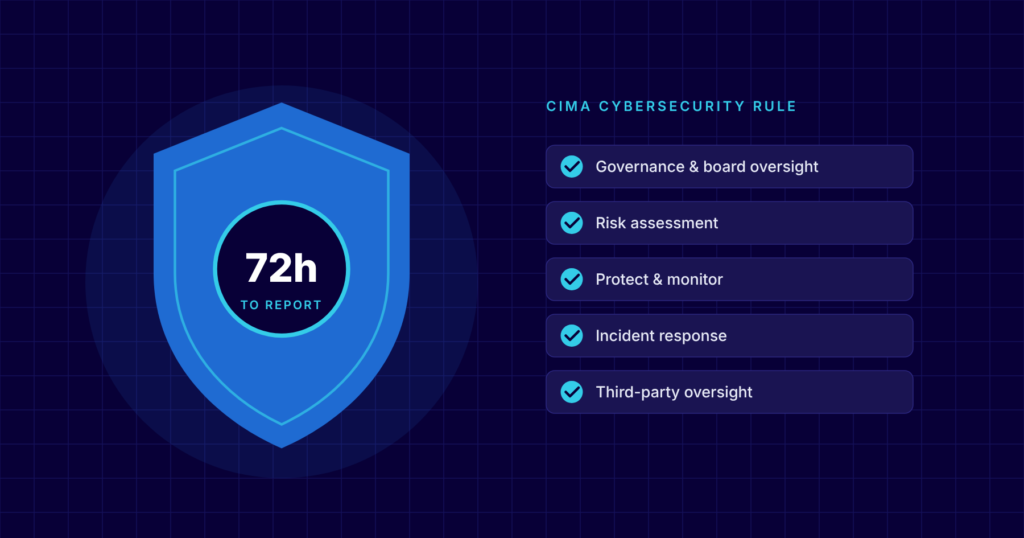
Regulated businessesIf the business is regulated by CIMA, check its compliance with the Rule on Cybersecurity for Regulated Entities, and ask your lawyers what approvals the change of ownership needs.
Questions to ask the seller
- Have you had a cyber incident, ransomware attack or personal data breach in the last three years?
- Can we see your network documentation, asset list and software licence records?
- Who has admin access to email, the firewall, the domain name and your main systems?
- When did you last test restoring from backup, and what happened?
- Which systems or devices are no longer supported by the manufacturer?
- Which IT contracts renew in the next 12 months, and what does it cost to end them?
- Is any client or staff data held outside Cayman, and with whom?
Turning findings into decisions
A due diligence report is most useful when it changes something in the deal. A large bill for replacing old servers or rebuilding security can be reflected in the price. Specific risks, such as an incident the seller has disclosed, can be covered by warranties or indemnities, which your lawyers will draft. Urgent fixes, like switching on multi-factor authentication for every account, can be made a condition of completion.
Whatever you decide, put the cost of the remaining work into your budget for the first year so it doesn’t come as a surprise later.
The first 100 days
- On the first day, take control of admin accounts, the domain name and the firewall, and change shared passwords.
- Add the new business to your monitoring, endpoint protection and backups straight away.
- Decide whether to merge the two Microsoft 365 tenants, and plan the move carefully so email isn’t lost.
- Warn staff on both sides about fake invoices and payment requests, which are easier to believe while suppliers and bank details are changing.
- Bring policies, user accounts and devices onto one standard, then retire whatever is left over.
How CNS can help
IT due diligence is part of our IT consulting service. A CNS consultant reviews the business on site in Cayman, talks to the people who run its IT and writes up the findings in plain English for you and your lawyers, with the likely cost of each fix. After the deal, our team can carry out the migration and bring the new office onto your systems.
More insights
Questions about your own setup?
Talk to a Cayman IT expert. No obligation, no jargon.